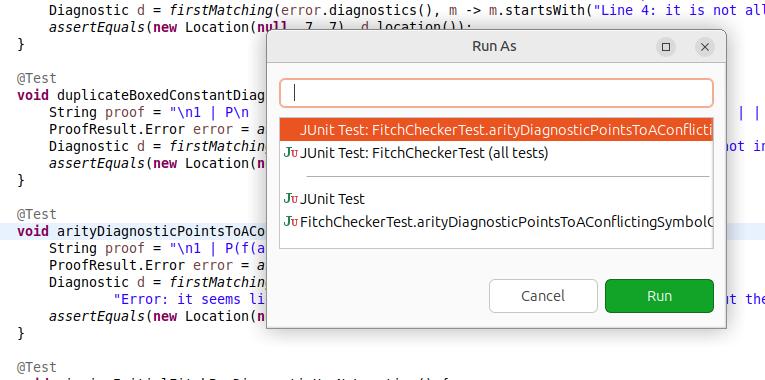
What it does#
In Eclipse, the Run As menu shows the ways to run the current file, for example “Java Application”, “JUnit Test” or “Single Rust Test”. To use it with the keyboard, you must open the context menu and go to the submenu, or know the key sequence of each choice (those ctrl+alt+shift+x and then t or j 😰). Instead I always wanted a quick select dialog that would feel what I want and then a simple Ctrl+F11 or F11 to repeat last action. Luckily there’s a vacant Shift+F11 in Eclipse.
This plugin shows the same choices in a small dialog:
| Key | Result |
|---|---|
Shift+F11 | Shows the Run As choices for the current editor or selection. |
Alt+Shift+F11 | Shows the Debug As choices. |
In the dialog, type to filter the list. Up and Down select a choice, and Enter
launches it. The dialog selects your last choice first, so Shift+F11 and then
Enter repeats it.
I added special shorcuts for Rust, to recognize that you’re in a unit test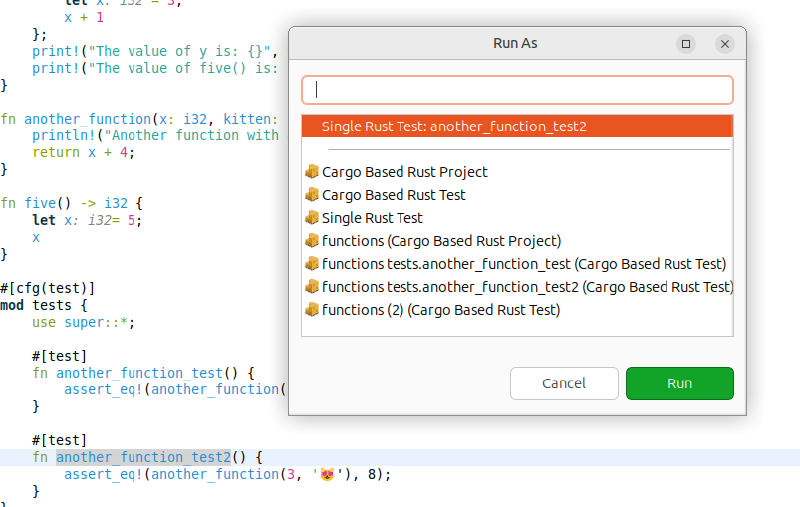
and for Java … the dialog will suggest the most appropriate action based on where you are in the file.
The list has the launch shortcuts that apply to the editor or selection, and then the launch configurations that these shortcuts give, as in the Run As menu. The plugin works for all languages, because it uses only the launch shortcuts of the Eclipse Platform.
If you need something interesting for a specific language, don’t hesitate to suggest and the launcher will be even handier.
Change the keys#
In Window > Preferences > General > Keys, find the commands Run As… and Debug As… in the category Run/Debug.
Install#
In Eclipse, select Help > Install New Software…
In Work with, type this address and press
Enter:https://anydoby.com/eclipseSelect Quick Launch in the category anydoby Eclipse plugins.
Click Next, accept the license (EPL-2.0) and click Finish.
Restart Eclipse.
The plugin needs Java 21 or later. Eclipse 4.41 is tested.
Notes#
- The same dialog is suggested for the Eclipse Platform. If the Platform adds it, this plugin is not necessary any more.
Changelog#
- 1.1.0: The test at the cursor comes first and is selected: JUnit test methods in Java, test functions in Rust. The list is as high as necessary for all choices.
- 1.0.0: First release: Shift+F11 shows the Run As choices, Alt+Shift+F11 the Debug As choices.